Historian v8.2 made the platform easier to plug into. v8.3, released today, makes your data easier to trust. It puts reference values in one place, shows you when a feed stalls, and makes calculations cheaper to run. Read the changelog here or continue reading.
Most data problems in a plant are silent. A limit gets updated in some calculations but not others. A feed stops overnight. One calculation slowly takes over the server. Each one makes the numbers a little less trustworthy. Historian v8.3 deals with all three.
Who this is for, and why it matters
This release is for the people who run plants and keep their data working: operations managers, automation engineers and the IT or data owners who look after the historian. It fits food and beverage, building materials, and fine and specialty chemicals, where a wrong setpoint or a silent data gap can mean scrap, downtime or a failed audit.
Recipe and grade data
Products, recipes and grades often map to a set of properties, such as target temperatures or bend times. Many teams keep that mapping in a separate database or in workarounds inside measurements. Lookup tables let you keep the mapping in Historian and read it directly from your calculations.
Machine limits and setpoints
When a temperature or pressure limit changes, every calculation that uses it has to be updated. If a copy also sits in a spreadsheet, the copies drift, and the mistake can go unnoticed for months. Lookup tables keep the value in one place, so one change reaches every calculation that uses it.
Teams moving from another historian
Teams moving from another historian often rely on lookup tables for recipe data and grade-to-property maps, and they need that data to keep working after the move. Lookup tables let you bring it into Historian and use it in your calculations.
Stalled feeds
A feed that stops updating can leave a dashboard showing the last good value for hours. The Last value column shows the newest value of every measurement, so a stalled feed stands out without opening each one.
Heavy calculations on a shared server
As more calculations run on the same server, slow ones can quietly take capacity from the rest. The calculation load view shows which calculations cost the most, and lower memory use with many calculations leaves more room on the same server.
Lookup tables: reference data in one place
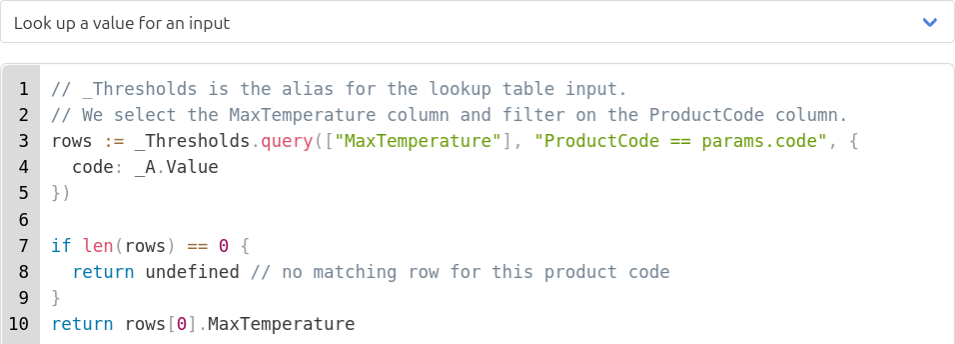
Lookup tables keep shared values in one typed table on the new Lookup tables page. Calculations and calculated event properties can read the table and filter its rows, so one change reaches every calculation that uses it. For example, keep a spec limit per product code in one table: change the limit once, and every calculation for that product follows.
- Import from xlsx or csv, and export the table to Excel
- Columns are typed as String, Number or Boolean
Creating or changing tables requires the lookup tables license feature. Access is controlled with the READ_LOOKUP_TABLES and MANAGE_LOOKUP_TABLES privileges.

See stalled feeds early
A feed that stops updating is easy to miss. The new Last value column shows the newest value of every measurement, with its timestamp, so a stalled feed stands out without opening each one.
See what each calculation costs
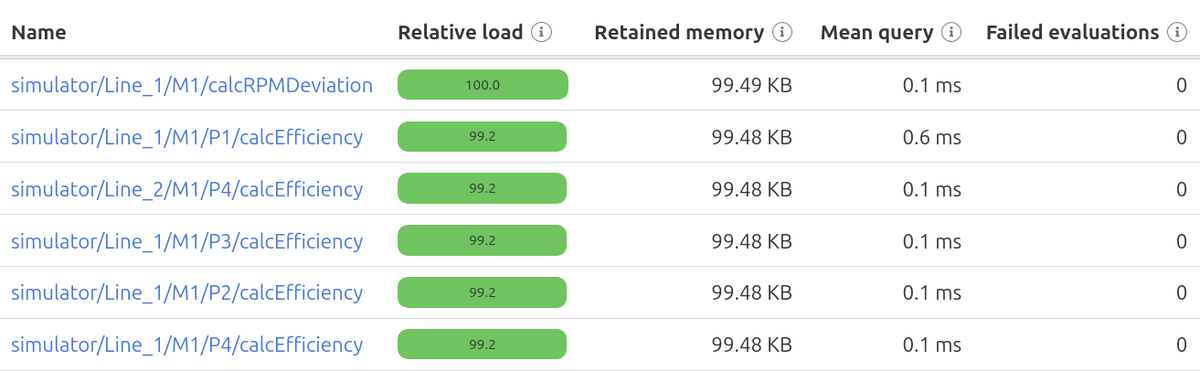
The new calculation load view shows what each calculation costs. Use it to find the calculations that slow the server before they become a problem. Memory use is also lower when many calculations run.
Built to stay fast as you grow
v8.3 targets the parts of the system that slow down on large databases:
Still the same Historian, still moving forward
v8.3 is about making the data you already collect easier to manage and trust. The full list of changes, including the upgrade details, is in the release notes.